Bluetooth Low Energy Examples
Many embeddedTS products provide on-board Wi-Fi and Bluetooth through a soldered-down module. Products without on-board Bluetooth can often use a USB Bluetooth adapter, but external adapters may require additional configuration that is not covered here.
This document focuses on Bluetooth Low Energy (BLE), not Bluetooth Classic. The primary provider of Bluetooth support in Linux is the BlueZ project. Distributions usually package BlueZ, but BLE support moves quickly, so building BlueZ from source can be useful when testing or developing BLE applications.
These examples are intended as known-working starting points. They are not a complete BLE development guide. BLE uses the Generic Attribute Profile (GATT) for communication, which provides a flexible base but moves much of the protocol design into the application layer.
The upstream examples assume at least Debian Stretch with a 4.9 kernel. Older distributions or kernels may have compatibility issues.
BlueZ
Installing BlueZ From Source
The upstream example uses BlueZ 5.61. These commands build and install BlueZ directly on the target device. Native compilation is slower than cross compilation, but avoids requiring a prepared cross-build environment.
First, remove the distribution BlueZ packages:
apt-get purge "bluez*"
Install build requirements. Some examples use Python 2 while others use Python 3:
apt-get update && apt-get install -y git libglib2.0-dev libglib2.0-0 libdbus-1-dev libdbus-1-3 libudev-dev libudev1 libical-dev libreadline-dev python3-dbus python3-pip python-dbus docutils-common
Download the BlueZ source:
wget https://www.kernel.org/pub/linux/bluetooth/bluez-5.61.tar.xz
tar xvf bluez-5.61.tar.xz
Configure, build, install, and start BlueZ:
cd bluez-5.61
./configure --enable-library --enable-test --enable-deprecated && make install
systemctl enable bluetooth
systemctl start bluetooth
On distributions older than Debian Stretch, it may be necessary to add --disable-manpages to the configure options.
The example tools are installed to /usr/local/lib/bluez/test/.
Running the Examples
Before running examples, the Bluetooth device must be powered and attached. See the board manual's Bluetooth section for the board-specific commands to bring up the on-board Bluetooth device.
If a board manual uses hciconfig, do not run that command with recent BlueZ examples. Recent BlueZ releases use centralized control through bluetoothd, and hciconfig can leave the service in an invalid state. If needed, hciattach is safe for attaching a device to the kernel, but btattach is preferred where applicable.
Most examples require a compatible external BLE device, such as a smartphone or another BLE peripheral.
Discover Devices
This script scans for nearby BLE devices and prints anything detected by the unit's BLE module.
Prerequisites
- The Bluetooth device is set up using the board manual's instructions, without using
hciconfig. bluetoothdis started as described above.- The command is run as
rootor by a user with suitable permissions.
Running
root@tsimx28:~# bluetoothctl power on
Changing power on succeeded
root@tsimx28:~# /usr/local/lib/bluez/test/test-discovery
[ XX:XX:XX:XX:XX:XX ]
    AddressType = public
    Name = ABC123
    Paired = 0
    ServicesResolved = 0
    Adapter = /org/bluez/hci0
    LegacyPairing = 0
    TxPower = 6
    Alias = ABC123
    Connected = 0
    UUIDs = ...
    RSSI = -48
    Trusted = 0
    Blocked = 0
...
The example continues to run and print newly discovered devices until Ctrl+c is pressed.
Example Advertisement
A BLE device must advertise to be found by scanning devices. This example creates an advertisement with a customized name.
Prerequisites
- A BLE-capable device, such as a smartphone running a BLE monitor tool.
- The Bluetooth device is set up using the board manual's instructions, without using
hciconfig. bluetoothdis started as described above.- The command is run as
rootor by a user with suitable permissions.
Running
Set a custom advertising name:
sed -i -e "s/'TestAdvertisement'/'TS_BLE_Demo'/" /usr/local/lib/bluez/test/example-advertisement
Some embedded modules cannot handle longer advertisement lengths, so comment out an example nonstandard advertisement type:
sed -i -e "s/self.add_data/#self.add_data/" /usr/local/lib/bluez/test/example-advertisement
Run the advertisement example:
root@tsimx28:~# /usr/local/lib/bluez/test/example-advertisement &
Advertising forever...
GetAll
returning props
Advertisement registered
root@tsimx28:~#
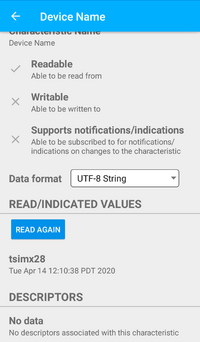
On another BLE-compatible device, a scan should show a device named TS_BLE_Demo. This device can be connected to, and the example starts several simple services. For example, the device name can be read:
Example GATT Server
The BlueZ example GATT server emulates a dummy device with a dummy battery. It demonstrates active BLE reads and subscribing to push notifications.
Prerequisites
- A BLE-capable device, such as a smartphone running a BLE monitor tool.
- The Bluetooth device is set up using the board manual's instructions, without using
hciconfig. bluetoothdis started as described above.- The command is run as
rootor by a user with suitable permissions. - The Example Advertisement example is running so the BLE device can be discovered.
Due to caching on some devices, it may be necessary to completely exit BLE applications or power-cycle the connecting BLE device before connecting to the example GATT server.
Running
root@tsimx28:~# /usr/local/lib/bluez/test/example-gatt-server
Registering GATT application...
GetManagedObjects
GATT application registered
root # The following lines will not be printed until the device connects and does a read of the "Battery Level" service
Battery Level read: 100
Battery Level read: 100
Battery Level drained: 98
Battery Level drained: 96
Battery Level drained: 94
...
root # The following lines will not be printed until the device connects and subscribes to the "Heart Rate Measurement" service
Update HR Measurement Simulation
Updating value: [dbus.Byte(14), dbus.Byte(93), dbus.Byte(0), dbus.Byte(0)]
Updating value: [dbus.Byte(6), dbus.Byte(127)]
Updating value: [dbus.Byte(6), dbus.Byte(108)]
Updating value: [dbus.Byte(6), dbus.Byte(128)]
...
root # The following lines will not be printed until the device connects and interacts with the "characteristic for testing" services
TestCharacteristic Write: dbus.Array([dbus.Byte(192), dbus.Byte(255), dbus.Byte(238)], signature=dbus.Signature('y'))
TestSecureCharacteristic Write: dbus.Array([dbus.Byte(222), dbus.Byte(250), dbus.Byte(206)], signature=dbus.Signature('y'))
TestCharacteristic Read: dbus.Array([dbus.Byte(192), dbus.Byte(255), dbus.Byte(238)], signature=dbus.Signature('y'))
TestSecureCharacteristic Read: dbus.Array([dbus.Byte(222), dbus.Byte(250), dbus.Byte(206)], signature=dbus.Signature('y'))
...
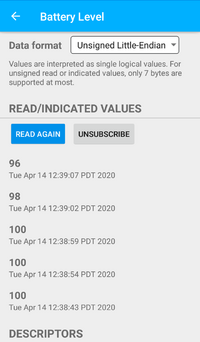
With the connecting device, it is possible to read from or subscribe to the Battery Level service. The running example prints Battery Level read: ... when the battery is read, and Battery Level drained: ... when a periodic subscribed update is sent.
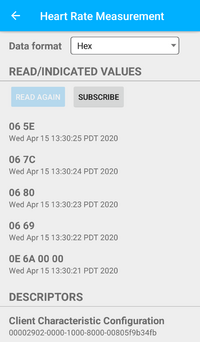
The connecting device can also subscribe to the Heart Rate Measurement service. The example prints simulation values once per second and sends those values to subscribed devices.
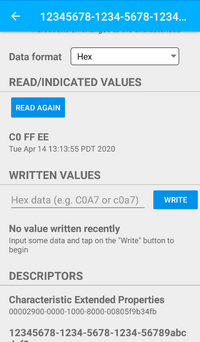
The connecting device can write and read the characteristic for testing services. Anything written to these services can be read back independently.
When done, press Ctrl+c to end the GATT server example. Leave the advertising example running in the background if you plan to continue testing.
Example BLE Library python-bluezero
The python-bluezero project provides a BlueZ API with very little boilerplate code. It includes simple examples that are useful for testing and as starting points for Python BLE applications.
embeddedTS is not affiliated with python-bluezero; it is included here because it provides practical examples and a straightforward abstraction over BlueZ and D-Bus.
Installing python-bluezero
Install BlueZ from source first, then install python-bluezero:
pip3 install evdev aioblescan
git clone https://github.com/ukBaz/python-bluezero
cd python-bluezero
git checkout f9179dc057d1428fd2d95eab82db4172c18d5e0b
python3 setup.py install
cp examples/ukBaz.bluezero.conf /etc/dbus-1/system.d/
The pinned python-bluezero commit is old, but newer releases require Python 3.6, which is unavailable on some older embeddedTS Debian images. On newer distributions, use a newer python-bluezero release when possible.
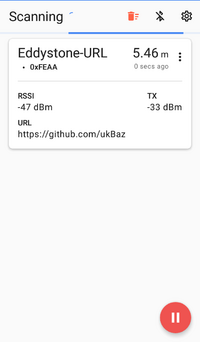
Eddystone-URL Beacon
Eddystone is an open beacon format developed by Google. It supports several payload types including unique IDs, URL broadcasting, and time-varying beacons that can resolve to stable identifiers.
Prerequisites
- A BLE-capable device, such as a smartphone running a BLE beacon scanner.
- The Bluetooth device is set up using the board manual's instructions, without using
hciconfig. bluetoothdis started as described above.- The python-bluezero project is installed as described above.
- The command is run as
rootor by a user with suitable permissions.
Running
root@tsimx28:~/python-bluezero# python3 examples/eddystone-url-beacon.py
Advertisement registered
The beacon can be observed on a device running a BLE beacon scanner:
Eddystone Beacon Scanner
This example continuously polls for and prints Eddystone format beacons. It prints URL and UID beacons, but may not correctly handle EIM or TLM beacons.
The Python binary distributed with Debian Stretch has a bug that can prevent this example from working correctly. Use Debian Buster or newer, or Buildroot, for this scanner when possible.
Prerequisites
- A BLE-capable device, such as a smartphone running a BLE beacon emulator.
- The Bluetooth device is set up using the board manual's instructions, without using
hciconfig. bluetoothdis started as described above.- The python-bluezero project is installed as described above.
- The command is run as
rootor by a user with suitable permissions.
Running
root@tsimx28:~/python-bluezero# python3 examples/eddystone-scanner.py
...
New Eddystone data:
        url = https://www.embeddedTS.com/
        mac address = XX:XX:XX:XX:XX:XX
        tx_power = -69
        rssi = -78
...
New Eddystone data:
        name space = 0xC7ACE534120F67D5345A
        rssi = -72
        mac address = XX:XX:XX:XX:XX:XX
        tx_power = -65
        instance = 0x42
Using aioblescan for Eddystone TLM Beacons
The aioblescan library supports printing Eddystone TLM beacons. With a beacon emulator or hardware beacon such as the ON Semi RSL10-COIN-GEVB demo board, TLM packets can be received and decoded:
root@tsimx28:~# python3 -m aioblescan -e
Google Beacon {'tx_power': 0, 'url': 'https://www.onsemi.com/b-idk', 'mac address': '60:c0:bf:26:df:db', 'rssi': -51}
...
Google Beacon {'temperature': 22.75, 'battery': 2478, 'uptime': 78100, 'pdu count': 109}
Google Beacon {'tx_power': 0, 'url': 'https://www.onsemi.com/b-idk', 'mac address': '60:c0:bf:26:df:db', 'rssi': -49}
...
Google Beacon {'temperature': 22.75, 'battery': 2479, 'uptime': 83000, 'pdu count': 116}
Google Beacon {'tx_power': 0, 'url': 'https://www.onsemi.com/b-idk', 'mac address': '60:c0:bf:26:df:db', 'rssi': -49}
...