TS-7250-V3
Overview
[IMAGE HERE]
The TS-7250-V3 is a PC104 form factor SBC with a PC104 bus, mikroBus, Digi XBEE header, soldered down eMMC flash, dual Ethernet, microSD, and wifi. This board also provides a migration path from the TS-7250-V2 and TS-7250 series systems.
This platform is a part of our Long-Term Support (LTS) Program and will remain supported by up-to-date software releases throughout the lifecycle of the device. This support includes the Linux kernel, userspace utilities, as well as our board support packages (BSPs) for building complete images ready for deployment.
Our official platform lifecycle policy is stated here: https://www.embeddedts.com/about/product-lifecycle
More information about our LTS program can be found here: https://www.embeddedts.com/embeddedts-lts-support
Reference Manuals and Guides
Debian Releases
| Release | Name | Released | Status |
|---|---|---|---|
| Debian 13 Manual | Trixie | 2025-08-09 | Current Stable |
| Debian 12 Manual | Bookworm | 2023-06-10 | Old Stable |
| Debian 11 Manual | Bullseye | 2021-08-14 | Archived |
Buildroot
| Release | Status |
|---|---|
| Buildroot 2025.02 LTS | Current LTS |
Yocto
| Release | Name | Released | Status |
|---|---|---|---|
| Yocto 6.0 | Wrynose | Real Soon Now | Future Stable |
| Yocto 5.0 | Scarthgap | April 2024 | Current Stable |
Ubuntu
| Release | Name | Released | Status |
|---|---|---|---|
| Ubuntu 24.04 Manual | Noble | 2024-04-25 | Current LTS |
| Ubuntu 23.04 Manual | Lunar | 2023-04-20 | Archived |
U-Boot
| Release | Status |
|---|---|
| U-Boot 2020.01 | Current Stable |
Getting started
A Linux workstation is recommended and assumed for development using this documentation. For users in Windows or OSX, we recommend virtualizing Linux. Most of our platforms run Debian, which is recommended for ease of use if there is no personal distribution preference.
Virtualization
Suggested Linux Distributions
Development using a Windows or OSX system may be possible but is not supported. Development will include accessing drives formatted for Linux and often Linux-based tools.
The main reasons that Linux is useful are:
- Linux filesystems on the microSD card can be accessed on the PC.
- More ARM cross-compilers are available.
- If recovery is needed, a bootable medium can be written.
- A network filesystem can be served.
- Builds such as Linux kernel, Buildroot, Yocto, and distro-seed will not work from WSL1/2 on a case-insensitive filesystem.
Connect USB Console
This board can get console from either the DB9 port as RS-232 for users in the enclosure, or the microUSB connector as a CDC-ACM through the onboard supervisory microcontroller.
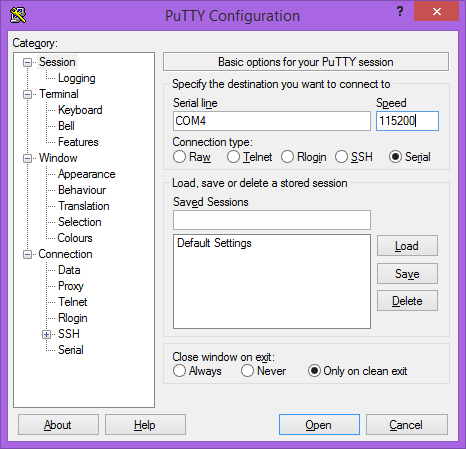
On the DB9 port this uses 115200 baud 8n1 with no flow control. The built in USB serial device is hard coded to the correct baud/mode and does not require configuration.
Our recommended path is typically using this under a Linux OS. If there is only one USB serial device connected to the Linux workstation it will be /dev/ttyACM0, or if there are other serial devices run:
ls /dev/serial/by-id/
This will list the device like /dev/serial/by-id/usb-embeddedTS_TS-7250-V3_Console_8BDBE9584E4B-if00.
Start a terminal with:
sudo picocom /dev/ttyACM0
or:
sudo picocom /dev/serial/by-id/usb-embeddedTS_TS-7250-V3_Console_8BDBE9584E4B-if00
Under Linux it is recommended to run this once so ModemManager does not probe the ACM device as a cellular modem:
echo 'ATTR{idVendor}=="35b0", ENV{ID_MM_DEVICE_IGNORE}="1"' > /etc/udev/rules.d/75-embeddedts-mm.rules
Console from Windows
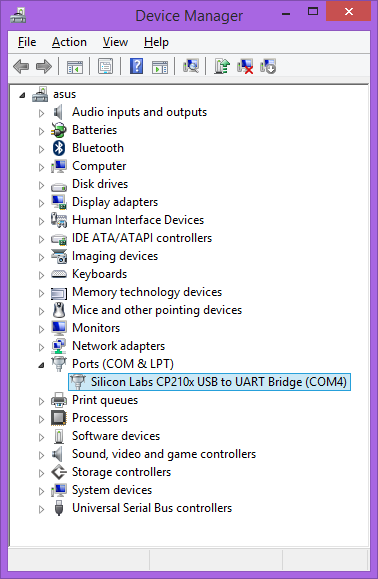
Putty is a small simple client available for download here. Open up Device Manager to determine your console port. See the putty configuration image for more details.
Console from MacOS
There are many serial terminal applications for MacOS, two commonly used applications are picocom, and screen. These examples demonstrate these applications and assume that the serial device is /dev/tty.usbmodem00D069C0FFEE1. Be sure to replace the serial device string with that of the device on your workstation.
picocom is a very small and simple client.
picocom -b 115200 /dev/tty.usbmodem00D069C0FFEE1
screen is a terminal multiplexer which happens to have serial support.
screen /dev/tty.usbmodem00D069C0FFEE1 115200
First Linux Boot
The TS-7250-V3 receives power through either the 5 VDC 2-pin terminal block connector near the DB9, or the 2 pin 8-48 VDC terminal block near the mikroBUS connector. Only a single power input may be connected at any time.
If a power supply is ordered with the TS-7250-V3 it will include the correct terminal block connected to the power supply. Otherwise the terminal block will ship with the unit.
The polarity is marked underneath the removable terminal blocks. Once power is applied the device will output information via the built in USB console.
The first output is from U-Boot:
Trying to boot from MMC1


-Boot 2020.01-40202-gb266a329da (Feb 03 2023 - 21:37:24 +0000)

CPU:   Freescale i.MX6UL rev1.2 696 MHz (running at 396 MHz)
CPU:   Automotive temperature grade (-40C to 125C) at 44C
Reset cause: POR
Model: embeddedTS i.MX6UL TS-7250-V3
Board: TS-7250-V3 REV C
FPGA: Rev 52 (b6aaace8)
DRAM:  1 GiB
MMC:   FSL_SDHC: 0, FSL_SDHC: 1
Loading Environment from MMC... OK
In:    serial
Out:   serial
Err:   serial
Net:
Warning: ethernet@20b4000 using MAC address from ROM
eth1: ethernet@20b4000
Warning: ethernet@2188000 using MAC address from ROM
, eth0: ethernet@2188000
Press ESC twice to abort autoboot in 1 second(s)
The message *** Warning - bad CRC, using default environment can be safely ignored. This indicates that u-boot scripts are not being customized. Typing "env save will hide these messages, but this is not needed.
The message using MAC address from ROM is indicating that the board is using the preprogrammed MAC address as intended. All boards are assigned 2 unique MAC addresses.
This U-Boot and its environment are loaded from the eMMC hardware boot partition (/dev/mmcblk0boot0). This is independent of the main eMMC user area (/dev/mmcblk0). From here, U-Boot follows the standard distro boot command. This checks for boot files on the first USB mass storage device, then by default finds a bootable image on eMMC.
From here the board will boot to our default Debian image.
When booting with the default settings, a shipped board will boot to the eMMC. The eMMC by default are pre-programmed with our default Debian image.
Login
Login as root, no password
Booting from USB
This board supports booting to an OS image written to a USB drive for development. For the most reliable boot we recommend eMMC boot.
This requires a Linux system to write the USB image.
Check lsblk or dmesg to find your USB drive, but the following examples will assume /dev/sdc.
wget http://files.embeddedTS.com/ts-arm-sbc/ts-7250-v3-linux/distributions/debian/tsimx6ul-debian-bullseye-latest.tar.xz
sudo sgdisk --zap-all /dev/sdc
sudo sgdisk -n 0:0:0 -t 0:8300 /dev/sdc
sudo mkfs.ext4 /dev/sdc1
sudo mkdir /mnt/usb/
sudo mount /dev/sdc1 /mnt/usb/
sudo tar --numeric-owner -xf tsimx6ul-debian-bullseye-latest.tar.xz -C /mnt/usb/
sudo umount /mnt/usb/
This can be run from the board while booted to eMMC, but this should not rewrite the same USB stick that the system has used to boot. Rewriting an image while it is used as the boot media will result in a corrupt image.
If this USB is plugged into USB on startup, it will be chosen instead of the onboard eMMC. For example:
U-Boot 2020.01-00009-g99e2080fad (Mar 12 2020 - 08:43:22 -0700)

CPU:   Freescale i.MX6UL rev1.2 696 MHz (running at 396 MHz)
CPU:   Automotive temperature grade (-40C to 125C) at 34C
Reset cause: POR
Model: Technologic Systems i.MX6UL TS-7250-V3
Board: TS-7250-V3
DRAM:  512 MiB
MMC:   FSL_SDHC: 0
Loading Environment from MMC... *** Warning - bad CRC, using default environment

In:    serial
Out:   serial
Err:   serial
Net:
Warning: ethernet@20b4000 using MAC address from ROM
eth1: ethernet@20b4000
Warning: ethernet@2188000 using MAC address from ROM
, eth0: ethernet@2188000
Press ESC twice to abort autoboot in 1 second(s)
starting USB...
Bus usb@2184000: USB EHCI 1.00
Bus usb@2184200: USB EHCI 1.00
scanning bus usb@2184000 for devices... 1 USB Device(s) found
scanning bus usb@2184200 for devices... 2 USB Device(s) found
       scanning usb for storage devices... 1 Storage Device(s) found

Device 0: Vendor: SanDisk  Rev: 0001 Prod: Extreme
            Type: Removable Hard Disk
            Capacity: 59836.1 MB = 58.4 GB (122544516 x 512)
... is now current device
Scanning usb 0:1...
Found U-Boot script /boot/boot.scr
675 bytes read in 8 ms (82 KiB/s)
root ## Executing script at 82000000
5348808 bytes read in 145 ms (35.2 MiB/s)
33863 bytes read in 8 ms (4 MiB/s)
Booting Debian from usb 0:1...
root ## Flattened Device Tree blob at 83000000
   Booting using the fdt blob at 0x83000000
   Loading Device Tree to 9ef68000, end 9ef73446 ... OK

Starting kernel ...

[    6.242409] cgroup: cgroup2: unknown option "nsdelegate,memory_recursiveprot"
[    6.251458] cgroup: cgroup2: unknown option "nsdelegate"


Welcome to Debian GNU/Linux 11 (bullseye)
Image Replicator
This platform supports our Image Replicator tool. The Image Replicator tool is intended for use by developers as a means to write bootable images or filesystems onto a device's media (SD / eMMC / SATA / etc.) as part of the developer's production or preparation process. In addition to writing media, the Image Replicator tool can capture images from a device's media and prepare them to be written to other devices.
Change Log
FPGA
See the current FPGA revision from the u-boot output:
Model: Technologic Systems i.MX6UL TS-7250-V3
Board: TS-7250-V3 REV A
FPGA:  Rev 24 (47555b21)
DRAM:  1 GiB
Or from Linux:
root@tsimx6:~# tshwctl -i
MODEL=7250
FPGA_REV=24
FPGA_HASH="47555b21"
OPTS=0x0
RAM_MB=1024
PCBREV=A
| Revision | Changes |
|---|---|
| 24 | Initial release |
| 45 |
|
| 49 |
|
| 50 |
|
| 51 |
|
| 52 |
|
| 53 |
|
| 56 |
|
| 57 |
|
| 77 |
|
See #Onboard_Firmware_Updates for more details on updating the system.
Since the release of REV C PCBs, REV A hardware should not use past REV 52. The update script shown above will update a REV C and later to the newest revision, and REV A to rev 52.
After updating the board must get a full power cycle to load the new bitstream. If the FPGA update fails then this must come back on an RMA to be recovered.
Firmware
The FPGA, supervisory microcontroller, and u-boot can all be updated in the field.
The supervisory microcontroller supports atomic updates so it is safe to update at any time, but the FPGA or u-boot must rewrite their running location. If an FPGA or u-boot update are interrupted at the wrong time this may require an RMA to recover.
Its recommended to run from the latest Debian headless image to run the updates, but the updates should run anywhere that has tssupervisorupdate. To run our update script:
wget https://files.embeddedts.com/ts-arm-sbc/ts-7250-v3-linux/update/update
chmod a+x ./update
./update
reboot
The updates will take effect on the next boot.
Microcontroller
On the engineering sampling units (REV A PCB) the microcontroller is a Silicon labs part, but this has been replaced with a Renesas RA4M2 on REV C and later. The REV C and later boards can be updated in the field:
| Revision | Description |
|---|---|
| 23 |
|
| 35 |
|
| 41 |
|
| 42 |
|
| 43 |
|
| 44 |
|
| 47 |
|
PCB
| Revision | Description |
|---|---|
| A |
|
| C |
|
U-Boot
Unless you are experiencing issues it is not recommended to change u-boot. If the board is written with an invalid u-boot this will require an RMA to recover.
| U-boot Links | Changes |
|---|---|
| SPL-20210513 u-boot-dtb-20210513.img | Initial release |
| SPL-20211015 u-boot-dtb-20211015.img |
|
| SPL-20230203 u-boot-dtb-20230203.img |
|
| SPL-20240820 u-boot-dtb-20240820.img |
|
| SPL-20251008 u-boot-dtb-20251008.img |
|
Errata
None
FCC Advisory
This equipment generates, uses, and can radiate radio frequency energy and if not installed and used properly (that is, in strict accordance with the manufacturer's instructions), may cause interference to radio and television reception. It has been type tested and found to comply with the limits for a Class A digital device in accordance with the specifications in Part 15 of FCC Rules, which are designed to provide reasonable protection against such interference when operated in a commercial environment. Operation of this equipment in a residential area is likely to cause interference, in which case the owner will be required to correct the interference at his own expense.
If this equipment does cause interference, which can be determined by turning the unit on and off, the user is encouraged to try the following measures to correct the interference:
Reorient the receiving antenna. Relocate the unit with respect to the receiver. Plug the unit into a different outlet so that the unit and receiver are on different branch circuits. Ensure that mounting screws and connector attachment screws are tightly secured. Ensure that good quality, shielded, and grounded cables are used for all data communications. If necessary, the user should consult the dealer or an experienced radio/television technician for additional suggestions. The following booklets prepared by the Federal Communications Commission (FCC) may also prove helpful:
How to Identify and Resolve Radio-TV Interference Problems (Stock No. 004-000-000345-4) Interface Handbook (Stock No. 004-000-004505-7) These booklets may be purchased from the Superintendent of Documents, U.S. Government Printing Office, Washington, DC 20402.
Limited Warranty
See our Terms and Conditions for more details.
Writing ANY of the CPU's one-time-programmable (OTP) registers will immediately void ALL of our return policies and replacement warranties. This includes but is not limited to: the 45-day full money back evaluation period; any returns outside of the 45-day evaluation period; warranty returns within the 1 year warranty period that would require SBC replacement. Our 1 year limited warranty still applies, however it is at our discretion to decide if the SBC can be repaired, no warranty replacements will be provided if the OTP registers have been written.
Setting any of the eMMC's write-once registers (e.g. enabling enhanced area and/or write reliability) will immediately void ALL of our return policies and replacement warranties. This includes but is not limited to: the 45-day full money back evaluation period; any returns outside of the 45-day evaluation period; warranty returns within the 1 year warranty period that would require SBC replacement. Our 1 year limited warranty still applies, however it is at our discretion to decide if the SBC can be repaired, no warranty replacements will be provided if the OTP registers have been written.
Trademarks
Arm and Cortex are registered trademarks of Arm Limited (or its subsidiaries) in the US and/or elsewhere.