TS-7553-V2
Overview
The TS-7553-V2 is a small embedded platform with an NXP i.MX6UL 696 MHz CPU with 512 MB DDR3 RAM. It is a spiritual successor to our TS-7553, using the same form factor and base features, but providing a more powerful CPU and many new features for overall better performance. The TS-7553-V2 can be ordered with soldered down WiFi with built in Bluetooth, our TS-SILO supercapacitor technology for safe shutdown upon power loss, non-volatile FRAM for 2 KiB of storage. There is also support for USB Gadget via the front USB B socket, an internal USB host port, support for our monochrome LCD and 4 button membrane keypad, and eMMC flash for a vast improvement over the TS-7553's NAND.
Reference Manuals and Guides
Debian Releases
| Release | Name | Released | Status |
|---|---|---|---|
| Debian 13 Manual | Trixie | 2025-08-09 | Current Stable |
| Debian 12 Manual | Bookworm | 2023-06-10 | Old Stable |
| Debian 9 Manual | Stretch | 2017-06-17 | Archived |
| Debian 8 Manual | Jessie | 2015-04-25 | End of Life - 2025-06-30 |
Buildroot
| Release | Status |
|---|---|
| Buildroot 2025.02 LTS | Current LTS |
Yocto
| Release | Name | Released | Status |
|---|---|---|---|
| Yocto 6.0 | Wrynose | Real Soon Now | Future Stable |
| Yocto 5.0 | Scarthgap | April 2024 | Current Stable |
U-Boot
| Release | Status |
|---|---|
| U-Boot 2016.03 | Current Stable |
Getting started
A Linux workstation is recommended and assumed for development using this documentation. For users in Windows or OSX, we recommend virtualizing Linux. Most of our platforms run Debian, which is recommended for ease of use if there is no personal distribution preference.
Virtualization
Suggested Linux Distributions
Development using a Windows or OSX system may be possible but is not supported. Development will include accessing drives formatted for Linux and often Linux-based tools.
The main reasons that Linux is useful are:
- Linux filesystems on the microSD card can be accessed on the PC.
- More ARM cross-compilers are available.
- If recovery is needed, a bootable medium can be written.
- A network filesystem can be served.
- Builds such as Linux kernel, Buildroot, Yocto, and distro-seed will not work from WSL1/2 on a case-insensitive filesystem.
Connect USB Console
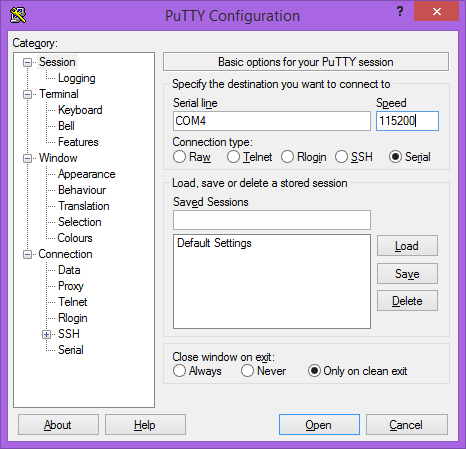
The TS-7553-V2 includes a USB type B device port which uses a 8051 based microcontroller to create a serial device on a host PC. The serial console is provided through this port at 115200 baud, 8n1, with no flow control. The USB serial device is a CP210x Virtual COM Port. Most operating systems have built-in support for this device. If not however, drivers are available for the device here.
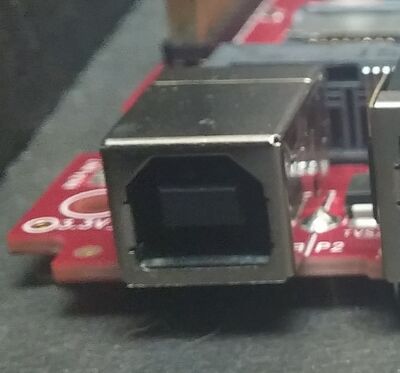
Note that this port can also be internally switched to connect to the CPU as a USB OTG/Gadget port.
Console from Linux
There are many serial terminal applications for Linux, three common used applications are picocom, screen, and minicom. These examples demonstrate all three applications and assume that the serial device is "/dev/ttyUSB0" which is common for USB adapters. Be sure to replace the serial device string with that of the device on your workstation.
picocom is a very small and simple client.
sudo picocom -b 115200 /dev/ttyUSB0
screen is a terminal multiplexer which happens to have serial support.
sudo screen /dev/ttyUSB0 115200
Or a very commonly used client is minicom which is quite powerful but requires some setup:
sudo minicom -s
- Navigate to 'serial port setup'
- Type "a" and change location of serial device to "/dev/ttyUSB0" then hit "enter"
- If needed, modify the settings to match this and hit "esc" when done:
     E - Bps/Par/Bits          : 115200 8N1
     F - Hardware Flow Control : No
     G - Software Flow Control : No
Navigate to Save setup as dfl, hit "enter", and then "esc"
Console from Windows
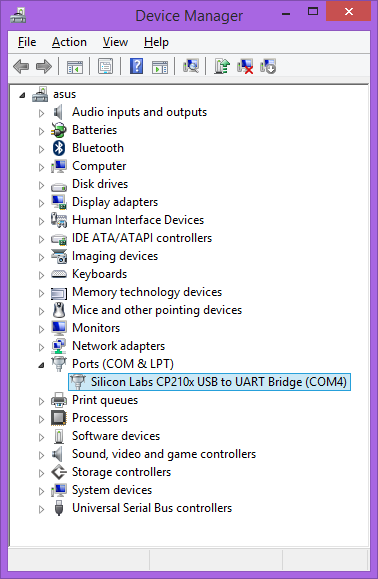
Putty is a small simple client available for download here. Open up Device Manager to determine your console port. See the putty configuration image for more details.
Console from MacOS
There are many serial terminal applications for MacOS, two commonly used applications are picocom, and screen. These examples demonstrate these applications and assume that the serial device is /dev/tty.usbmodem00D069C0FFEE1. Be sure to replace the serial device string with that of the device on your workstation.
picocom is a very small and simple client.
picocom -b 115200 /dev/tty.usbmodem00D069C0FFEE1
screen is a terminal multiplexer which happens to have serial support.
screen /dev/tty.usbmodem00D069C0FFEE1 115200
First Linux Boot
Be sure to take appropriate Electrostatic Discharge (ESD) precautions. Disconnect the power source before moving, cabling, or performing any set up procedures. Inappropriate handling may cause damage to the board.
The TS-7553-V2 has an input voltage range of 5 V to 28 V DC through the main power connector which offers screw terminals for secure wiring or a barrel jack. Please note that while the TS-ENC820 endcap lists "5V-12V", the input voltage range is still 5 V to 28 V DC with the unit in the enclosure. See the P1 pin header diagram for screw terminal power locations. See the CN6 Barrel Jack section for details about the coaxial power connector.
The TS-7553-V2 will require approximately 1 W at idle. An ideal power supply for the TS-7553-V2 will allow up to 5 W to power additional peripherals without issue. See the Specifications section for more information on power input.
Once power has been applied, output will be available on the serial console. The next section of the manual provides information on getting the console port set up. The first output is from the bootrom and will look like the following:
U-Boot 2016.03-00305-g75344a5 (Dec 15 2017 - 13:53:14 -0800)

CPU:   Freescale i.MX6UL rev1.1 at 396 MHz
Reset cause: POR
Board: Technologic Systems TS-7553-V2
I2C:   ready
DRAM:  512 MiB
MMC:   FSL_SDHC: 0, FSL_SDHC: 1
*** Warning - bad CRC, using default environment

Net:   FEC0 [PRIME]
Booting from the SD card ...
** File not found /boot/boot.ub **
34511 bytes read in 162 ms (208 KiB/s)
5460520 bytes read in 391 ms (13.3 MiB/s)
NO CHRG jumper is set, not waiting
Kernel image @ 0x80800000 [ 0x000000 - 0x535228 ]
## Flattened Device Tree blob at 83000000
   Booting using the fdt blob at 0x83000000
   Using Device Tree in place at 83000000, end 8300b6ce

Starting kernel ...


Welcome to Debian GNU/Linux 8 (jessie)!

[ SKIP ] Ordering cycle found, skipping D-Bus System Message Bus Socket
         Expecting device dev-ttymxc0.device...
[  OK  ] Reached target Remote File Systems (Pre).
...
[  OK  ] Started Update UTMP about System Runlevel Changes.

Debian GNU/Linux 8 ts-imx6ul ttymxc0

ts-imx6ul login:
The U-Boot build date reflects when U-Boot was built and serves as a revision indicator. A change to the kernel or filesystem will not affect this date.
Login
Login as root, no password
Image Replicator
This platform supports our Image Replicator tool. The Image Replicator tool is intended for use by developers as a means to write bootable images or filesystems onto a device's media (SD / eMMC / SATA / etc.) as part of the developer's production or preparation process. In addition to writing media, the Image Replicator tool can capture images from a device's media and prepare them to be written to other devices.
Change Log
Product Changes
New eMMC Chip
Due to an EOL on the older Micron MTFC4GMDEA-4M IT part, the replacement Micron MTFC4GACAJCN-4M IT has been qualified for use on this board. This new eMMC flash includes write reliability enabled by default. This will improve reliability for power loss events without requiring user intervention.
This updated part also has a larger erase block size which will require an updated production processes for those using the emmc_reliability script. This new chipset will require the latest version including this patch to function correctly.
MicroController Changes
| Revision | Changes |
|---|---|
| 0xF |
|
| 0x10 |
|
PCB Changes
| Revision | Changes | |||||||||
|---|---|---|---|---|---|---|---|---|---|---|
| B |
| |||||||||
| C |
| |||||||||
| D |
| |||||||||
| E |
| |||||||||
| E02[1] |
|
[1]BOM Change Only, same PCB revision
U-Boot
| Revision | Changes |
|---|---|
| February 16, 2017 | Initial release for PCB Rev. B |
| April 5, 2017 |
|
| April 24, 2017 |
|
| October 16, 2017 |
|
| December 15, 2017 |
|
| January 15, 2018 | Set USB 5 V power enable early in U-Boot for USB production |
| November 13, 2019 | Allows booting arbitrary FDTs based on option straps. Only needed for custom variants. |
Errata
Microcontroller Sleep at 5 VDC Input
Description
At 5 VDC input range to the TS-7553-V2, sleep modes of the microcontroller may be unreliable. The symptom is an immediate reboot after the sleep command is issued (instead of sleeping for the specified time and then turning back on), with the microcontroller reporting a poweron reboot source from tsmicroctl -i instead of the correct sleep reboot source.
Projected Impact
This can cause applications relying on sleep modes to not correctly sleep and instead immediately reboot.
Workaround
The 8-28 VDC input range is not affected by this issue. Sleep will always perform as expected when running in this higher input voltage range.
Proposed Solution
No fix scheduled.
FCC Advisory
This equipment generates, uses, and can radiate radio frequency energy and if not installed and used properly (that is, in strict accordance with the manufacturer's instructions), may cause interference to radio and television reception. It has been type tested and found to comply with the limits for a Class A digital device in accordance with the specifications in Part 15 of FCC Rules, which are designed to provide reasonable protection against such interference when operated in a commercial environment. Operation of this equipment in a residential area is likely to cause interference, in which case the owner will be required to correct the interference at his own expense.
If this equipment does cause interference, which can be determined by turning the unit on and off, the user is encouraged to try the following measures to correct the interference:
Reorient the receiving antenna. Relocate the unit with respect to the receiver. Plug the unit into a different outlet so that the unit and receiver are on different branch circuits. Ensure that mounting screws and connector attachment screws are tightly secured. Ensure that good quality, shielded, and grounded cables are used for all data communications. If necessary, the user should consult the dealer or an experienced radio/television technician for additional suggestions. The following booklets prepared by the Federal Communications Commission (FCC) may also prove helpful:
How to Identify and Resolve Radio-TV Interference Problems (Stock No. 004-000-000345-4) Interface Handbook (Stock No. 004-000-004505-7) These booklets may be purchased from the Superintendent of Documents, U.S. Government Printing Office, Washington, DC 20402.
Limited Warranty
See our Terms and Conditions for more details.
Writing ANY of the CPU's one-time-programmable (OTP) registers will immediately void ALL of our return policies and replacement warranties. This includes but is not limited to: the 45-day full money back evaluation period; any returns outside of the 45-day evaluation period; warranty returns within the 1 year warranty period that would require SBC replacement. Our 1 year limited warranty still applies, however it is at our discretion to decide if the SBC can be repaired, no warranty replacements will be provided if the OTP registers have been written.
Setting any of the eMMC's write-once registers (e.g. enabling enhanced area and/or write reliability) will immediately void ALL of our return policies and replacement warranties. This includes but is not limited to: the 45-day full money back evaluation period; any returns outside of the 45-day evaluation period; warranty returns within the 1 year warranty period that would require SBC replacement. Our 1 year limited warranty still applies, however it is at our discretion to decide if the SBC can be repaired, no warranty replacements will be provided if the OTP registers have been written.
Trademarks
Arm and Cortex are registered trademarks of Arm Limited (or its subsidiaries) in the US and/or elsewhere.